


Kawaii Wallpaper
0.00.00 Reviews
App Specs
- Version
- 1.0
- Updated On
- License
- Free
- Downloads
- 10,000+
- Developer
- VÕ CHÍ SANG
- Categories
- Personalization
- Platform
- Android
Screenshots
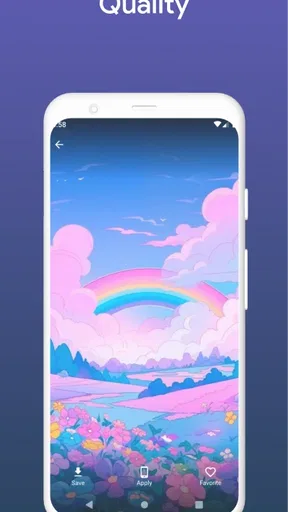
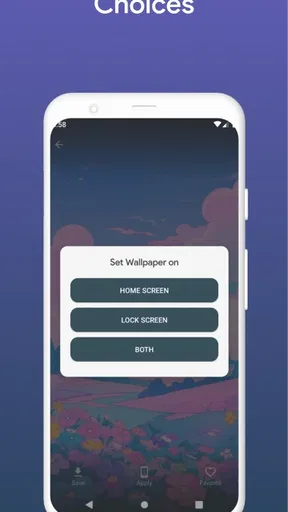
 Analysis by AppCompare
When I decide to change my phone’s look, I usually want something more specific than a random picture: a mood that feels cheerful without making icons hard to read. That is the appeal of Kawaii Wallpaper, a free personalization app by VÕ CHÍ SANG focused on cute visual styles. It has reached over 10,000 installs, is rated for Everyone, and is listed at version 1.0. I’d consider it if pastel colors and playful illustrations are already your thing, but I would approach it as a focused wallpaper choice rather than a complete home-screen makeover.
Start with the screen you actually use
Before browsing, I find it helps to think about where the image will go. A lock screen can handle more detail because it is viewed on its own; a home screen has app icons and widgets competing for attention. That small distinction makes a real difference with cute designs, where little faces, stars, and decorative shapes can end up hidden behind shortcuts. I would first decide whether I want a calm background for daily use or a more expressive image for the screen I see less often.
This is also where the app’s visual niche is useful. Instead of starting with general photography or broad abstract art, I’m looking for a kawaii feel: soft colors, charming subjects, and a light, dreamy atmosphere. If that is not the look you want, a general wallpaper library will give you a wider range. If it is, a focused collection can make browsing feel less like sorting through unrelated images.
What’s the Deal with Kawaii Wallpaper?
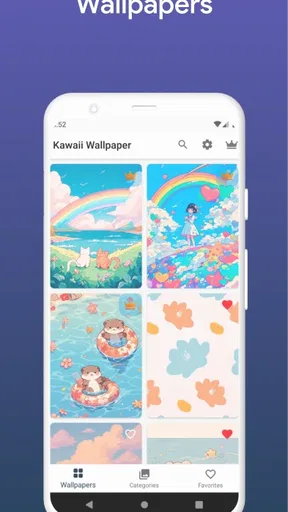
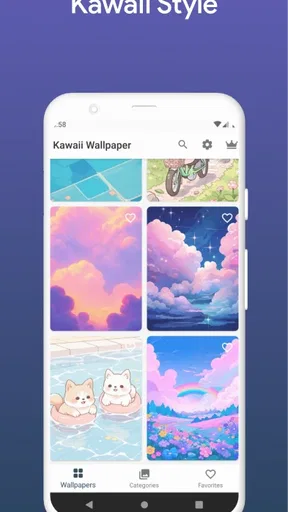
So, let’s get into it. Kawaii Wallpaper is pretty much exactly what it sounds like: an app filled with an endless supply of super cute wallpapers. From pastel hues to charming illustrations, it’s like the app reached into the heart of cuteness and sprinkled it all over your screen. And, honestly, who wouldn’t want that?
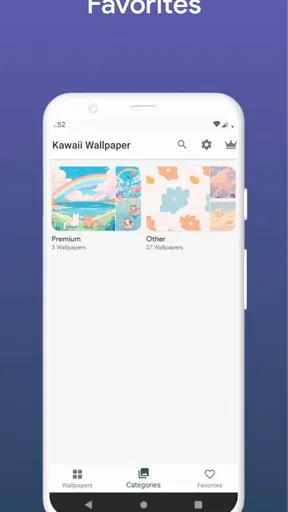
Upon opening the app, you’re greeted with a user-friendly interface that’s as easy to navigate as it is delightful to look at. The developers definitely knew what they were doing here, keeping things simple yet effective. You can browse through a variety of categories or check out the latest additions to keep your wallpaper game fresh and fabulous.
Features that Make You Go "Awww"
Let’s talk features because that’s where this app really shines. You’ve got a plethora of options to choose from, whether you’re into cute animals, dreamy landscapes, or whimsical patterns. The app frequently updates its collection, ensuring that there’s always something new to catch your eye.
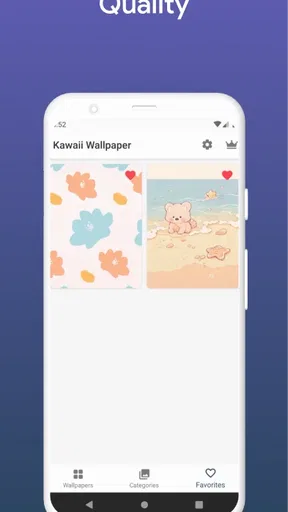
One of the standout features is the ability to save your favorites. This means you can bookmark those extra special wallpapers for quick access later. Plus, the app’s search function is pretty spot-on, allowing you to find exactly what you’re in the mood for without any hassle.
Worth Reading Before You Choose

Baby Panda World Brings Quick Play to Modern Phones, but Its Game Library Feels Busy

ESPN’s Live Game View Makes Following Close Games Easier

QuizzLand Review: A Good Fit for Short Trivia Breaks, Not Every Player

Basketball Stars: Multiplayer Is Fast, but Can It Recover When Matches Go Wrong?

WEBTOON Turns Phone Updates Into a Better Reading Routine

Link to Windows Runs on Shared Habits, Not Social Feeds
Turn browsing into a practical choice
My most useful habit with this kind of collection is to browse with a purpose instead of saving every design that makes me smile. I’d pick a few candidates, then compare them at the screen size where they will actually appear. A wallpaper that looks lovely in a preview may feel busy once icons sit on top of it, so checking the focal point and the empty space around it is more helpful than judging the picture alone.
Favorites are particularly handy for keeping a small rotation of options rather than making the same search every time I want a change. I’d use them to separate, for example, a soft everyday choice from a brighter image for weekends. That is a simple workflow, but it makes a collection feel personal and reduces the temptation to keep changing the background whenever a new image catches my eye.
Getting Creative with Your Screen
If you’re the creative type, you’ll love the customizable options. The app lets you adjust the wallpapers to fit your screen perfectly, ensuring that each image looks its best without any awkward cropping. And for those who like to mix things up, there’s a slideshow feature that rotates through your selected wallpapers at intervals you choose.
Another cool aspect is the community feature. Here, users can share their own creations or find inspiration from others. It’s like a little hub of kawaii creativity, bringing people together over a shared love of all things adorable.
From wallpaper choice to a usable home screen
Setting an image is only part of the job; the real test is how the screen works afterward. When I choose a detailed illustration, I’d keep the busiest part away from the area where notifications or app icons gather. If the wallpaper can be adjusted to fit, I would make that decision before applying it, rather than accepting a crop that cuts off the feature I liked in the preview. The practical goal is a background that still feels cute while leaving the phone easy to use.
A realistic use case is changing the lock screen before a busy week, choosing a design that gives me a small lift whenever I check the time, while leaving the home screen simpler for finding apps quickly. Someone who enjoys a coordinated look could instead use the slideshow option for variety, but I’d keep the selected set visually compatible. A mix of very different colors can make the phone feel less cohesive, even when every individual image is appealing.
Easy on the Eyes and the Device
Now, let’s address a common concern with wallpaper apps: performance. Rest assured, Kawaii Wallpaper is designed to be light on your device. It doesn’t drain your battery or hog your storage space, which is always a big win in my book. The app runs smoothly, with wallpapers downloading quickly and applying without a hitch.
Even better, the app’s developers seem committed to maintaining this level of performance. Regular updates keep everything running efficiently, and any bugs are swiftly squashed. It’s clear they’ve put a lot of thought into ensuring a seamless user experience.
Where the workflow can fall short
The main trade-off is that a themed wallpaper app has a narrower brief than a broad image browser. If I want landscapes, photographs, minimal gradients, and cute drawings all in one place, a general wallpaper app is likely a better fit. Likewise, anyone who prefers a completely plain background for maximum icon contrast may find the illustrations too decorative, even if they enjoy the style in isolation.
I’d also treat customization as a choice that needs a quick visual check, not a guarantee that every image will suit every display layout. Different phones place interface elements in different areas, and a crop that works for one screen can hide a detail on another. Before settling on a favorite, I’d look at it with the clock, icons, and widgets in place. That extra check is more useful than repeatedly swapping images after they have already been applied.
For a person wondering whether the app costs anything, it is free to download, with in-app purchases listed from twelve cents to $19.99 per item. I would check the purchase prompt carefully before confirming anything, especially if I only want to browse and save a few backgrounds. The app’s basic appeal is its visual theme; spending is not necessary to understand whether that style suits your phone.
Who will enjoy it, and who may want another option
I’d recommend giving it a look if you regularly change your wallpaper, enjoy pastel or whimsical art, and want a collection organized around that mood. It also suits someone who likes to keep a handful of favorites ready for different occasions rather than hunting through a mixed library each time. The Everyone age rating makes its intended audience broad, though the design style itself will naturally appeal most to people who like cute illustrations.
I’d skip it if your priority is a highly configurable launcher, icon packs, widgets, or a full theme that changes the whole interface. A wallpaper app is one part of personalization, not a substitute for those tools. It may also be the wrong choice if you need a very specific image style outside the kawaii look, or if you prefer to use your own photos as the main focus. In those cases, a general image source or the phone’s built-in wallpaper picker is a more direct route.
Why You Should Download Kawaii Wallpaper
At the end of the day, if you’re looking to add a splash of cuteness to your daily life, this app is a no-brainer. It’s packed with adorable content, offers great customization options, and doesn’t compromise on performance. Plus, with its community features, you’re not just downloading an app; you’re joining a little world of kawaii enthusiasts.
So, go ahead and give Kawaii Wallpaper a try. Whether you’re a long-time fan of all things cute or just looking to brighten up your screen, this app is the perfect blend of charm and functionality. Trust me, your phone will thank you for it!
My final take after choosing a style
I see this as a light, specific way to give a phone a softer personality, not an essential tool for every kind of user. The strongest reason to try it is the focused kawaii aesthetic; the clearest reason to look elsewhere is wanting broader imagery or deeper control over the entire interface. Its current version is 1.0, and it was released on August 27, 2025, so I’d keep expectations grounded and judge it by the wallpapers and workflow that are useful to me now.
My practical recommendation is to choose one design for the screen you check most, confirm the crop and icon visibility, then save only a few alternatives you genuinely expect to use. That makes the app’s cute style serve your everyday routine rather than turning wallpaper browsing into another chore. If that sounds like the kind of small refresh you want, it is worth exploring; if you need a complete visual overhaul, pair a wallpaper choice with other personalization tools or choose a broader alternative.
Pros
- Vast collection of cute wallpapers.
- User-friendly interface and navigation.
- Regular updates with new content.
- High-quality images and resolutions.
- Easy to save and share wallpapers.
Cons
- Ads can be intrusive at times.
- Limited customization options.
- Some wallpapers require in-app purchases.
- Occasional loading delays.
- No offline access to wallpapers.
FAQs for Kawaii Wallpaper
What features does Kawaii Wallpaper offer?
Kawaii Wallpaper offers a vast collection of high-quality, cute and adorable wallpapers for your device. Users can explore categories like animals, food, and more, and set wallpapers with a simple tap. The app also allows you to save your favorites, and it regularly updates with new designs to keep your device fresh and lively.
Is Kawaii Wallpaper free to use?
Yes, Kawaii Wallpaper is free to download and use. However, it includes optional in-app purchases that allow users to unlock premium content or remove ads. The free version still offers a wide range of wallpapers, ensuring you have plenty of cute options to choose from without spending a dime.
Does Kawaii Wallpaper consume a lot of battery or data?
Kawaii Wallpaper is optimized to be battery and data-friendly. While browsing, some data usage is expected due to image downloads, but it's kept to a minimum. Additionally, once you've set a wallpaper, it doesn’t require additional data or significantly affect battery life, making it a convenient choice for users.
Can I use Kawaii Wallpaper on both Android and iOS devices?
Yes, Kawaii Wallpaper is available for both Android and iOS platforms. The app is designed to provide a seamless experience across different devices, ensuring that users can enjoy its features, whether they’re using a smartphone or a tablet. Be sure to check your device’s compatibility in the app store.
How frequently are new wallpapers added to the app?
The developers of Kawaii Wallpaper are committed to keeping the app fresh and engaging by adding new wallpapers regularly. Updates often include seasonal themes, new categories, and trending designs, ensuring users always have access to the latest and most popular cute wallpapers to personalize their devices.


